


Random playback
Random playback is operated in the same
way a CD is played. Refer to “Random
playback”. Each time you press the
 button for 0.5 second or longer
(type
C audio)/
button for 0.5 second or longer
(type
C audio)/  button (the “RDM”
button)
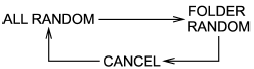
briefly (type D audio), the mode changes
in the following sequence.
button (the “RDM”
button)
briefly (type D audio), the mode changes
in the following sequence.
See also:
Making a phone call by saying number
1. Select the top menu (phone menu).
2. Press the talk switch .
3. Say “DIAL BY NUMBER”.
4. Press the talk switch again.
5. Say the desired phone number to be
called.
6. Select the “DIAL” menu ...
Manual transmission, front differential and rear differential gear oil
For the checking procedure, or other details, refer to “Manual transmission
oil”, “Front differential gear oil (AT models)”, “Rear differential
gear oil”. ...
Shift lock release using the shift lock release button
Perform the following procedure to release the shift lock.
1. Apply the parking brake and stop the engine.
2. Remove the shift lock cover using a flat-head screwdriver.
3. While depressing the ...